 CalendarBar
Your Google Calendar in the Mac menu bar.
See what's next, join the call in one click, and get a heads-up before meetings you can't miss. Free, from Kumpan.
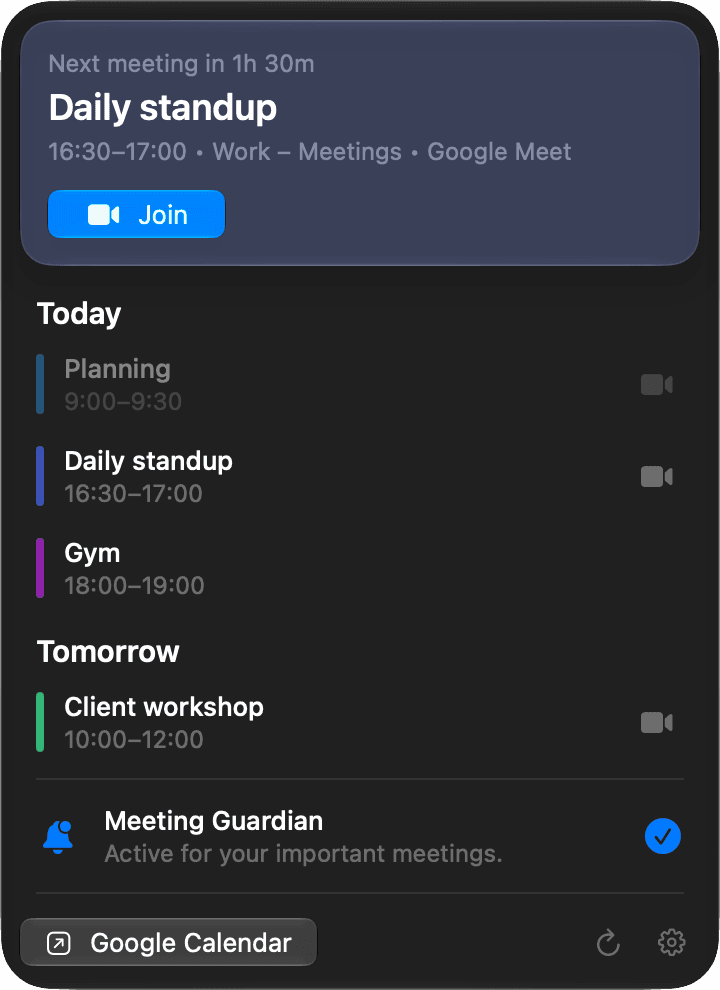
Join in one click
The next meeting sits at the top of the menu, with its video link one click away.
- Google Meet, Zoom, Microsoft Teams and Webex
- Opens in the right Google account
- Today and tomorrow at a glance
Meeting Guardian
A hard-to-miss alert just before meetings with a video link or other guests.
- Join or snooze for five minutes
- Shows over full-screen apps
- Alert when it starts, or 1, 2 or 5 minutes before
Built for the way you already work.
Work and private
Add several Google accounts. A meeting that’s on more than one calendar shows once.
The calendars you already picked
CalendarBar shows the calendars ticked in Google Calendar’s sidebar, in their own colours.
Keeps itself up to date
New versions install in two clicks, and only if they’re signed by Kumpan and notarized by Apple.
Read-only. Your calendar never leaves your Mac.
When you sign in, CalendarBar asks Google for read-only access to your calendar list and events, and for your email address to tell accounts apart. It has no server, and your calendar data is never sent to Kumpan or anyone else.
Privacy policy